One claim each, with the example and the limit on the same page. Maya, Dana, and Jordan are made-up people from
our demo company, Kestrel & Vale Realty. Nothing here is a recording of a real customer.
Running today
These run for the sales teams inside our company. A design partner gets the same ones.
01
Calls from the browser
Click a name and the call is placed. Nothing to install.
Say
Call one person, or work down a list and connect whoever picks up.
Leave a voicemail with one click.
Transfer the call. Group and multi-line dialing turn on per customer.
Example
Maya at Kestrel & Vale opens Dana Ellison’s record and clicks Call. The browser places it. Dana does not answer, so Maya leaves the recorded voicemail and moves to the next name.
If it goes wrong
If the person you transfer to does not pick up, the caller is not left in silence. They go to a backup line you choose, or they hear when to call back.
How we know
This is how our own sales teams call, every day. The path a failed transfer takes is covered by an automated check, and we can show that check.
The limit
Calls do not show a local number, and caller ID is not branded.
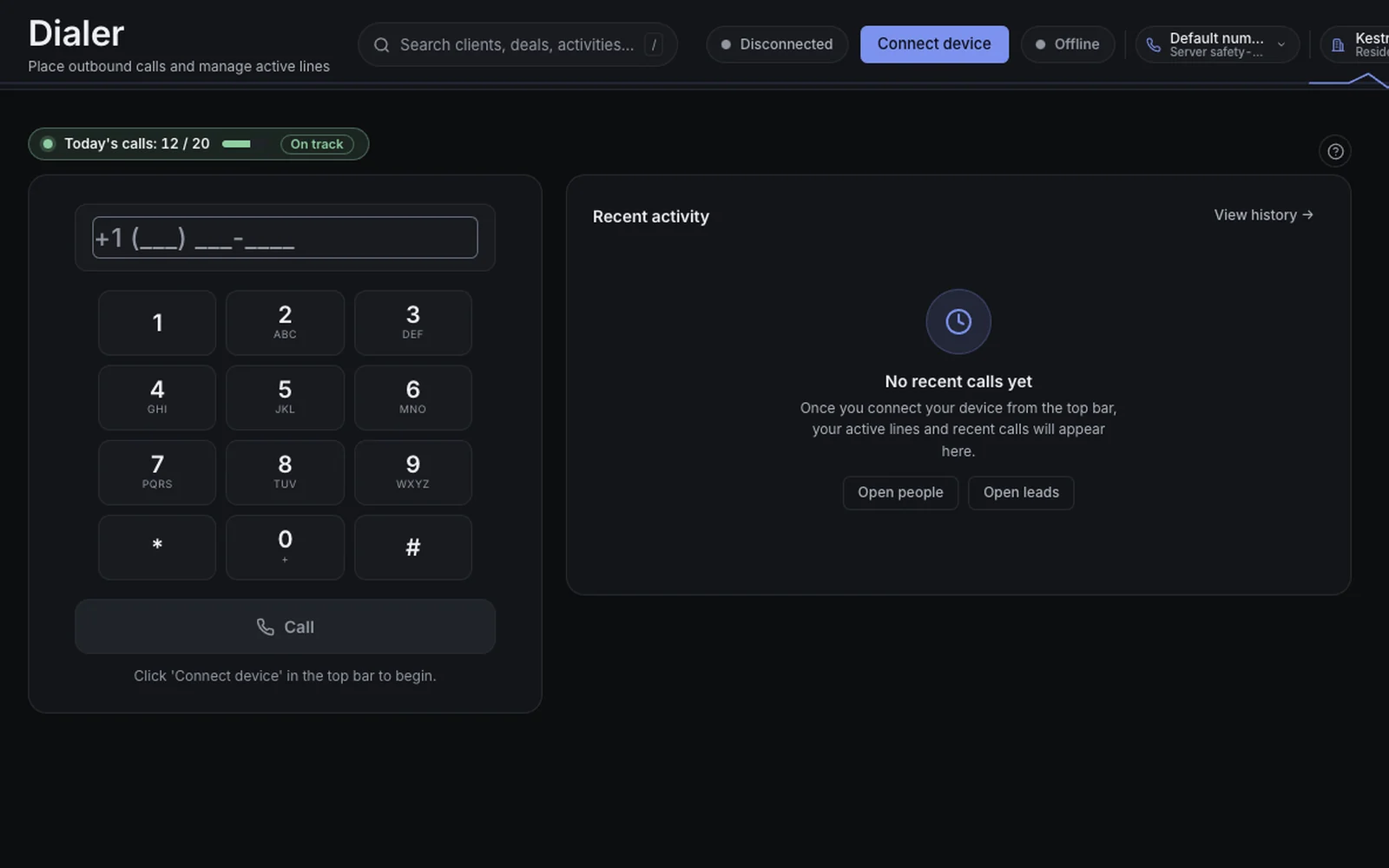
The screen
The dialer on the demo company. The names are fictional.
02
An AI voice agent works the list
The agent calls through a list or answers the phone, then hands the people who want to talk to a person.
Say
Outbound through a campaign, or answering an inbound call.
A real conversation, then a warm transfer to a live rep.
If nobody is free, it books a callback.
Example
The agent works Kestrel & Vale’s open-house list. Jordan says he wants to talk about the listing. The agent transfers him to Maya, and his record is already open when she picks up.
If it goes wrong
If Maya does not pick up, Jordan goes to a backup line or hears when to call back. He is not left in silence.
How we know
Our own teams run these campaigns. A failed transfer is sent to the backup on purpose, and an automated check covers that path.
The limit
AI voice minutes are billed at what the provider charges us, plus 30%. There are no bundled minutes.
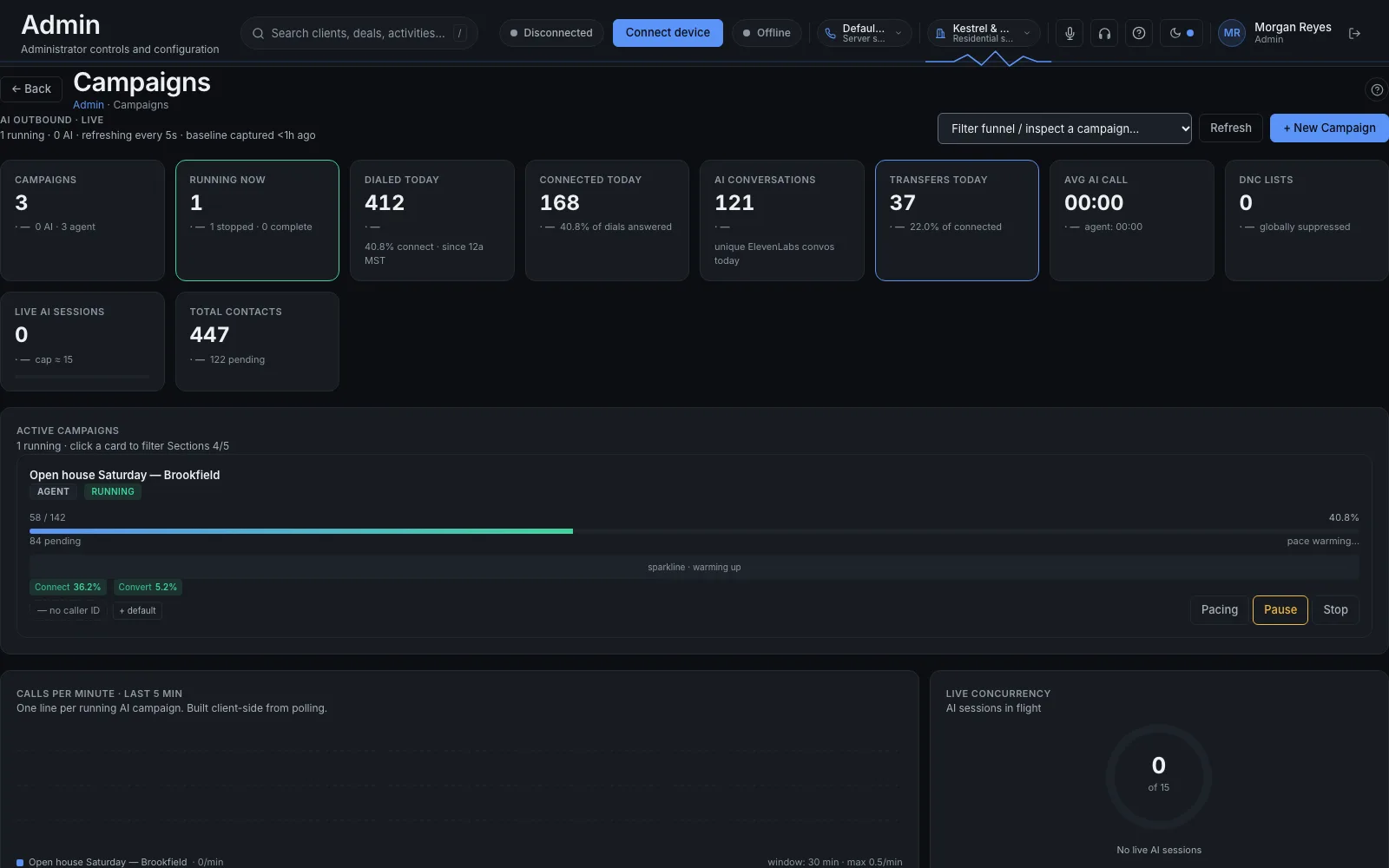
The screen
The Saturday open-house campaign, running, with 37 transfers today. The names are fictional.
03
Do-Not-Call, checked before every dial
Numbers on your Do-Not-Call list are never dialed. If the check cannot run, the call does not go out.
Say
The list is checked before the call, not after.
This is your own list. It is not the national registry.
A failed check stops the call. It does not skip the check.
Example
Dana asked not to be called, and her number is on the list. The next pass reaches her name and the dialer refuses it. Maya sees the skip. The phone does not ring.
If it goes wrong
The dangerous case is the check itself being down. The call does not go out. Under the Telephone Consumer Protection Act, one call like that can cost up to $500, and up to $1,500 if a court decides it was on purpose.
How we know
The voice check is built to fail closed. An automated test locks the behaviour: when the check cannot run, the call is not placed. We can walk through that test.
The limit
We do not download the national Do-Not-Call registry. The list is the one you keep.
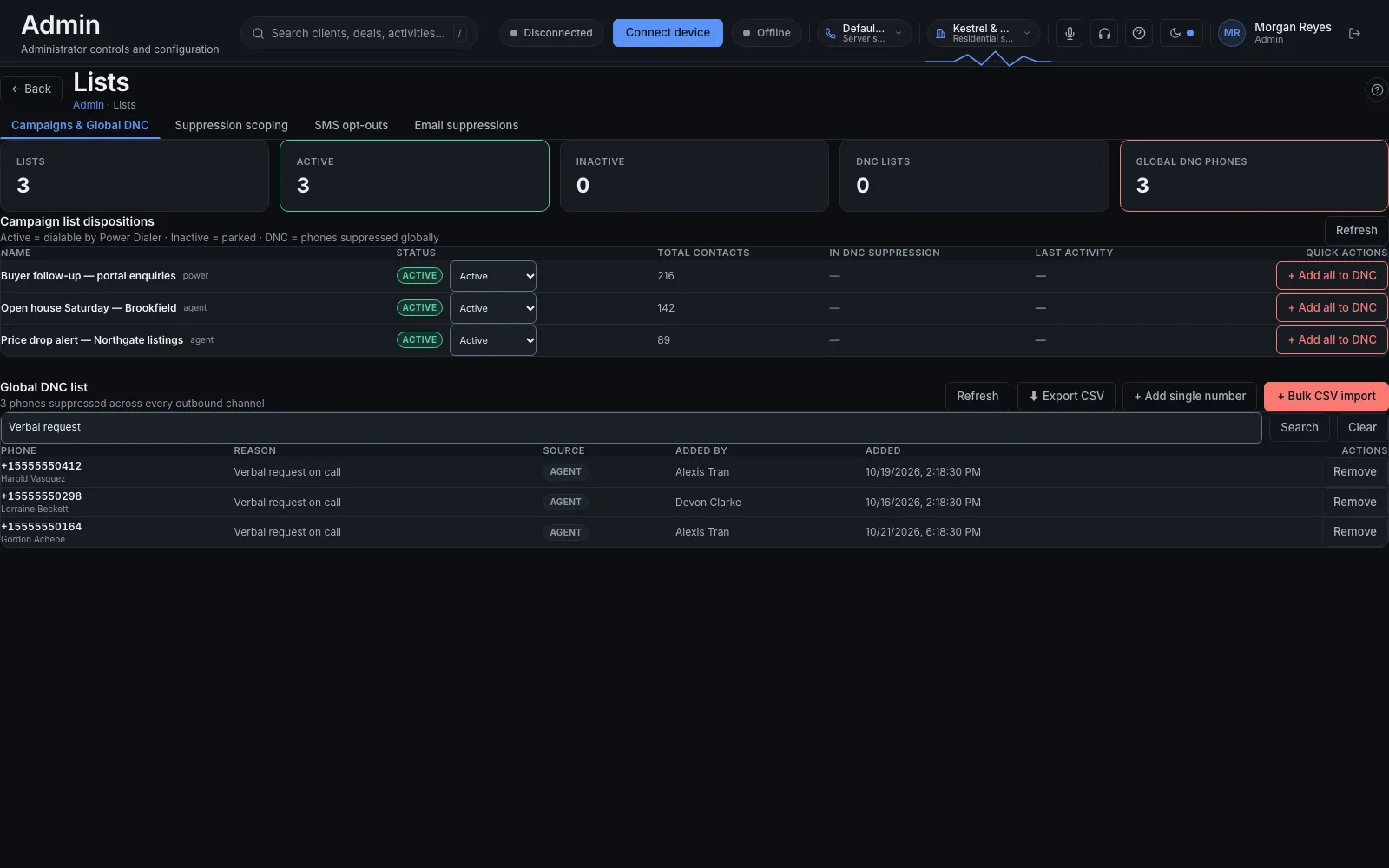
The screen
Three numbers on the company Do-Not-Call list, each added because the person asked on a call not to be called. The names are fictional.
04
Callbacks and who calls next
Mark how the call ended, set who calls back and when, and send each new lead to the right person.
Say
Every call gets a disposition.
A callback is a person and a time, kept on their record.
A new lead goes to a person by a rule you set.
Example
Dana asks Maya to call Thursday at 10. Maya sets that on the record before she hangs up. Thursday morning it is at the top of Maya’s list, with the note from today.
If it goes wrong
The callback list is people to call back. It is not a hold queue, and it does not keep a caller waiting on the line.
How we know
Dispositions, the callback list, and lead assignment are what our own teams use to start the day.
The limit
Nothing here dials the callback on its own. A person places it.
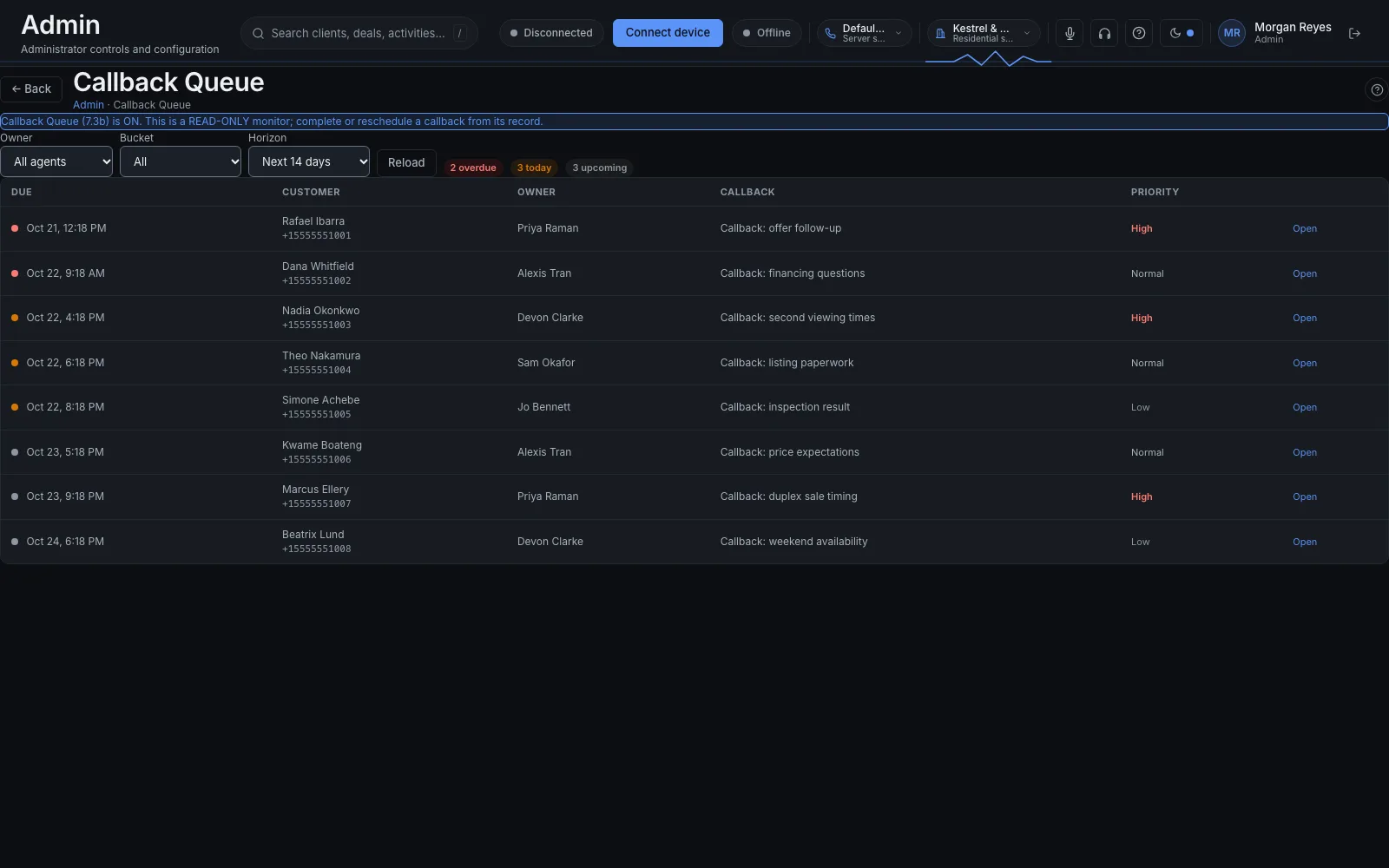
The screen
The callback queue. Nadia Okonkwo is due today, and Devon Clarke owns the call. The names are fictional.
05
One record for each person
Everything about a person in one place. The same person found twice becomes one record, and you can undo it.
Say
Status, owner, source, notes, and the history of calls.
A spreadsheet upload creates the people.
A merge keeps one history. Undo puts the two records back.
Example
Dana is on the open-house sheet and on a referral list. The import spots the same phone number, combines the two into one record, and keeps both sources. Maya calls her once.
If it goes wrong
Two reps calling the same person the same afternoon is how a lead decides you are disorganised. The merge is what stops that, and it can be undone if it combined the wrong two people.
How we know
Find-and-merge with undo is in daily use on our own teams, and an automated check covers the merge.
The limit
A form on your website does not create leads yet. That switch is off until we turn it on with you.
The screen
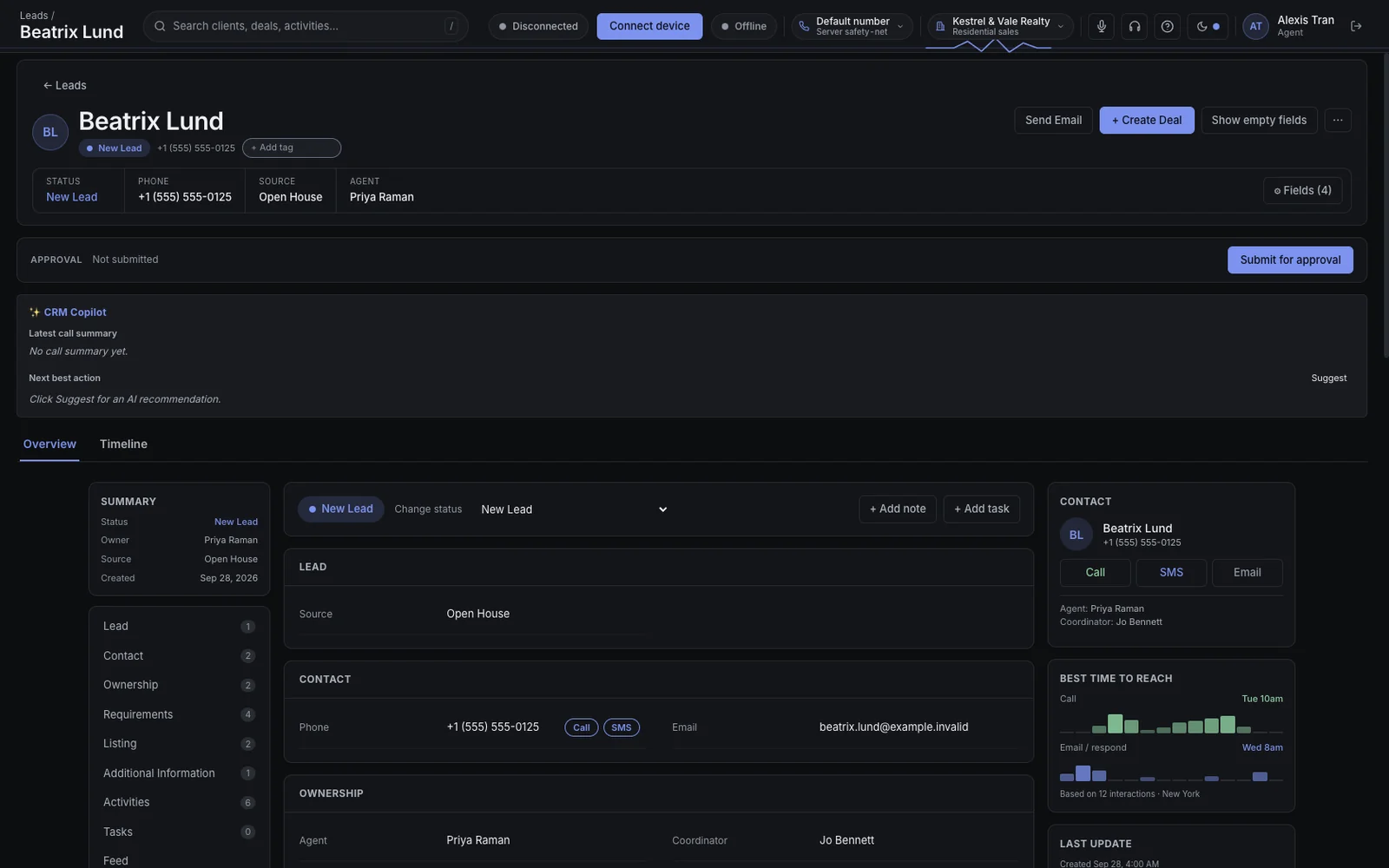
One person’s record on the demo company. The names are fictional.
06
A pipeline you can see
Drag a deal from one stage to the next. Each column shows what it is worth.
Say
One board for the team.
A running total on every stage.
The forecast is the board. It is not a separate spreadsheet.
Example
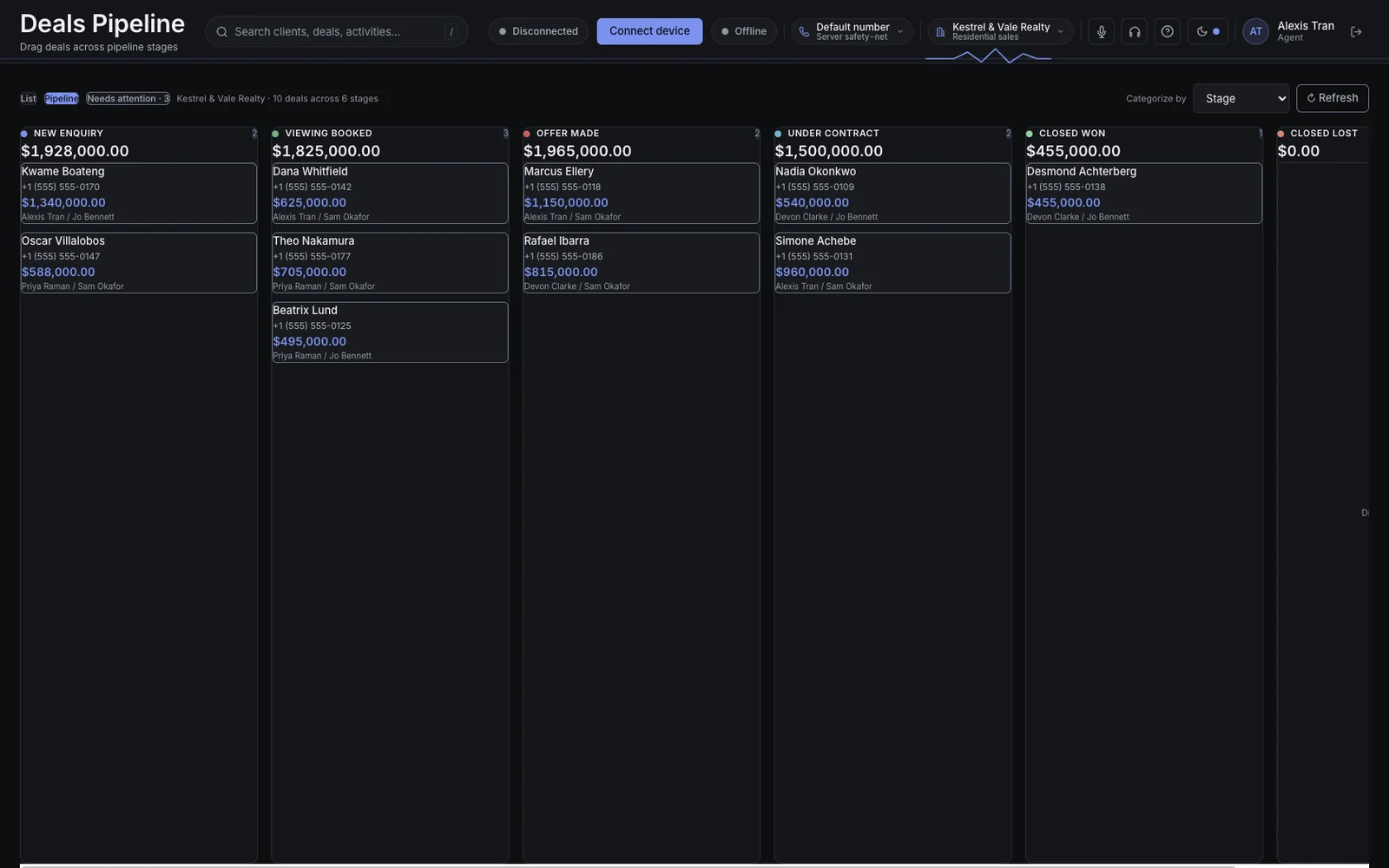
Dana’s offer moves from Showing to Under contract. Maya drags it. The column total changes, and her manager sees it without asking her to update a sheet.
If it goes wrong
A deal does not move because of a guess. A person drags it, or a rule you wrote moves it.
How we know
The board is what our own teams look at. The totals are computed from the deals on it.
The limit
The total is the sum of the deals in that column. It is not a probability-weighted forecast.
The screen
The deals board on the demo company. The names and amounts are fictional.
07
Call history and reports
Every call and its outcome, with reports on calls, deals, and people, inside the app. Commissions are worked out for you.
Say
Call history, with how each call ended.
Reports on calls, deals, and people, opened in the app.
Commissions calculated from the deals, not retyped.
Example
Monday, Maya’s manager opens the week: calls made, conversations, deals that moved, and the commission owed. It is on the screen in front of him.
If it goes wrong
A report can be put on a schedule. It is not emailed. If someone is waiting for it to arrive in an inbox, it will not.
How we know
Reports, forecasting, and commissions run for our own teams. Email delivery of a report is switched off, and the page says so.
The limit
You open the report in the app. We do not send it.
The screen
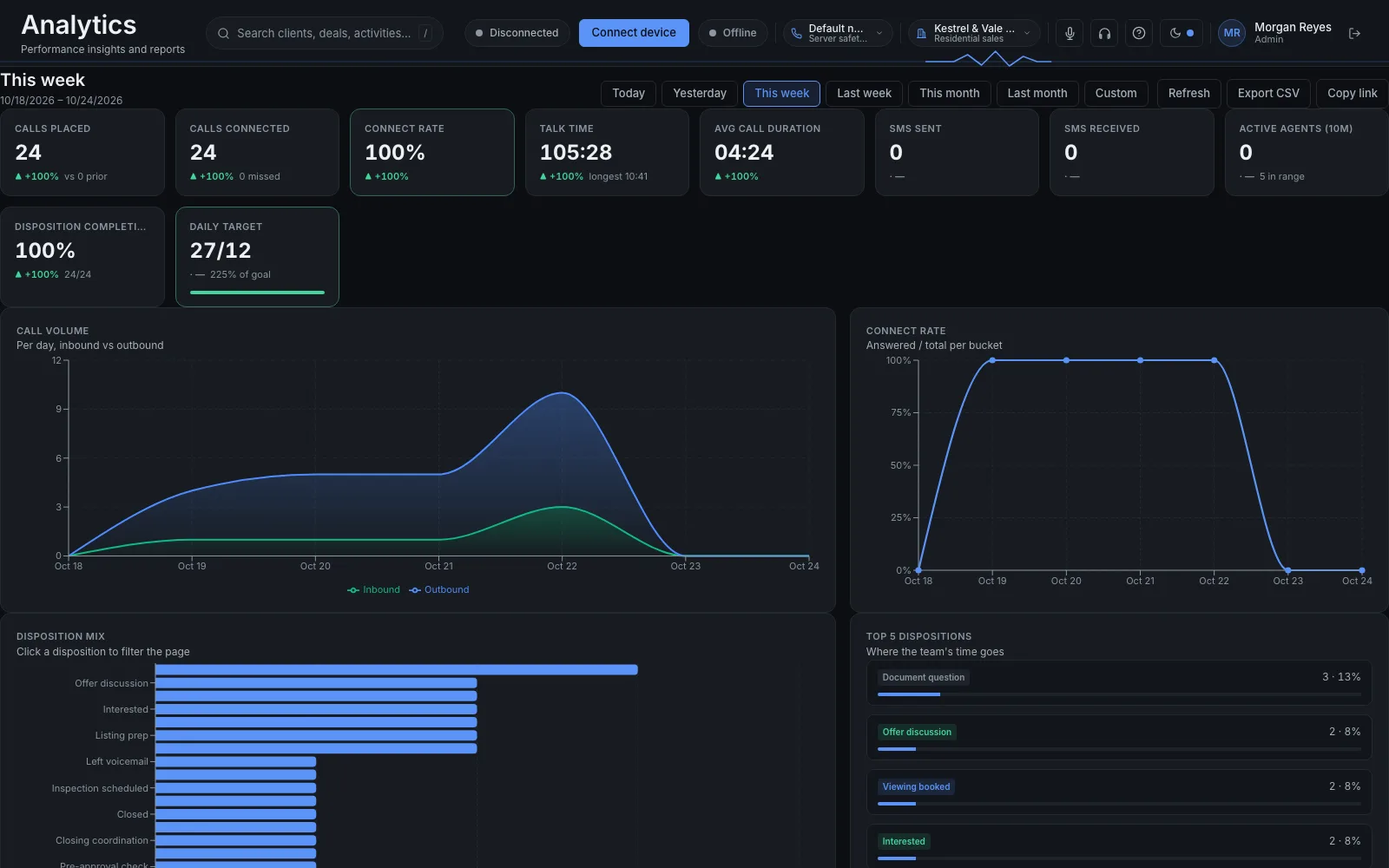
Calls for this week: 24 placed and 24 connected.
08
Sign in with Microsoft
Your team signs in with the work accounts they already have. Switch them off in Microsoft and they are off here.
Say
Microsoft sign-in. No separate password for this app.
If you are not on Microsoft 365, we can set sign-in up as part of setup.
Disabling the Microsoft account stops the next sign-in.
Example
Alex’s last day is Friday. His Microsoft account is disabled that afternoon. On Monday he cannot open the list.
If it goes wrong
A session that is already open is not cut off at that moment. The next sign-in is refused. Do not expect a disable to end a call that is already in progress.
How we know
This is how our own teams sign in. An inactive account is refused on the next sign-in. There is no Google sign-in and no password of our own.
The limit
Enterprise SAML is switched off for a security reason. Microsoft sign-in is the way in.
The screen
Not captured yet: The Microsoft sign-in screen for this app.
09
A coaching dashboard for managers
Managers see scorecards and a review queue. A live board shows who is on a call.
Say
Scorecards, and a queue of calls to review.
A board of who is on a call right now.
A record that needs a sign-off waits for one.
Example
Maya’s manager opens the queue, works through the calls she flagged yesterday, and sees that two people are on calls now.
If it goes wrong
Automatic scoring is paused. Listening back to a recording waits until we have proved, for your deployment, that only your people can reach your recordings. The dashboard is included. Those two are not.
How we know
The coaching dashboard and the approvals queue run for our own teams. Scoring stays paused, and recording review stays held back, on purpose.
The limit
This is a dashboard and a queue. It does not score a call for you, and it does not play a recording yet.
The screen
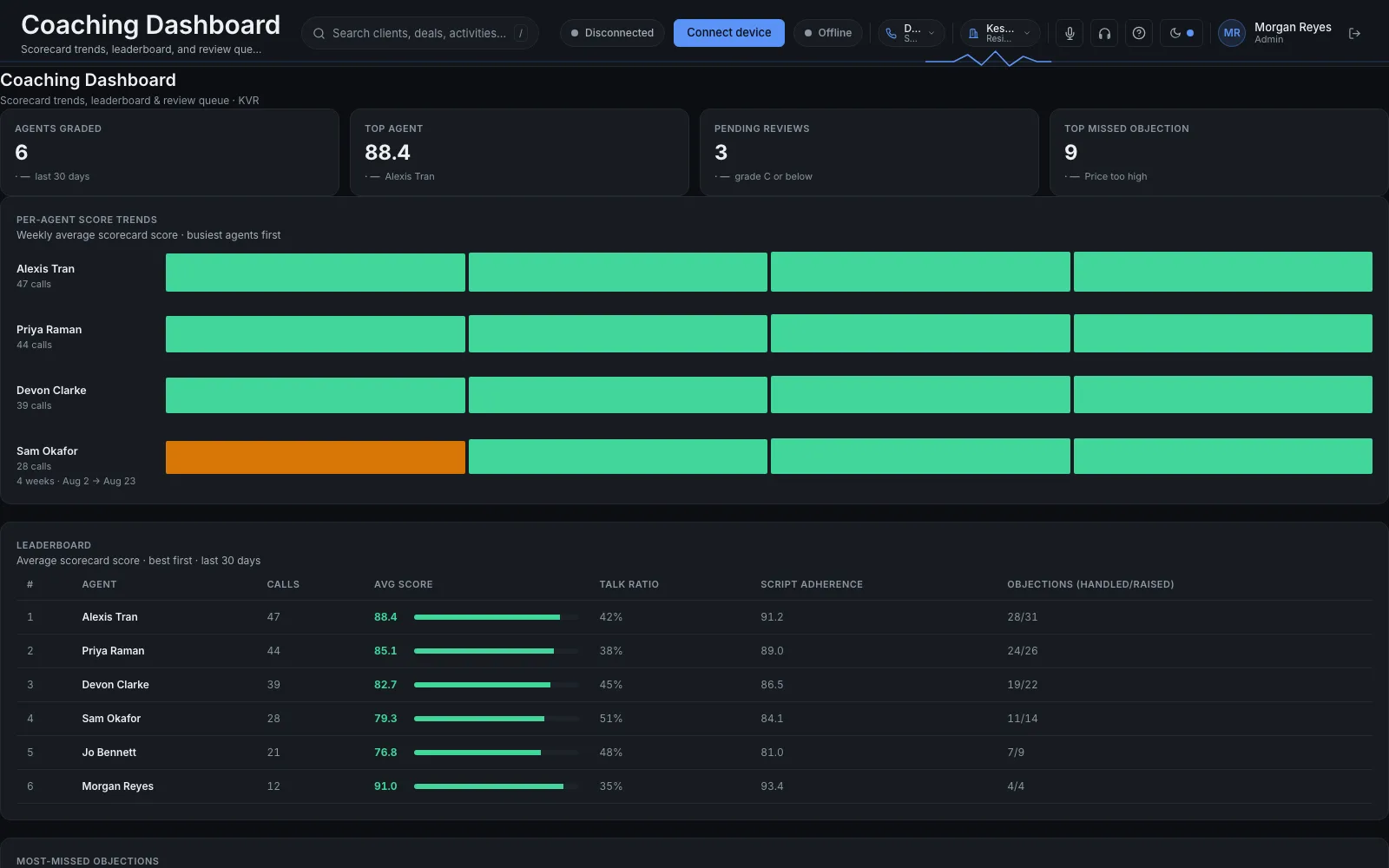
The coaching dashboard. Six agents graded, and three calls waiting for review. The names are fictional.
Switched on with you
Built and tested. A carrier approval, a mail setup, or a key we issue with you. Then it is on.
10
Texting, one person or a list
Text one person from their record, or a whole list. Anyone who replies STOP is taken off, every time.
Say
Two-way, from the same record as the calls.
STOP is honoured on every send.
It turns on after the carriers approve your business. We file the paperwork with you.
Example
After the call, Maya texts Dana the address of the showing. Months later Dana replies STOP to a different message. She is off the list before the next send.
If it goes wrong
Texting does not turn on the day you sign. The carriers approve your business, the registration is called A2P 10DLC, and they set the timing. A long text can count as more than one message.
How we know
Two-way texting with STOP is what our own teams use. Your registration is a separate filing, and nothing sends until that approval exists.
The limit
There is no texting on day one. The carriers decide when it starts.
The screen
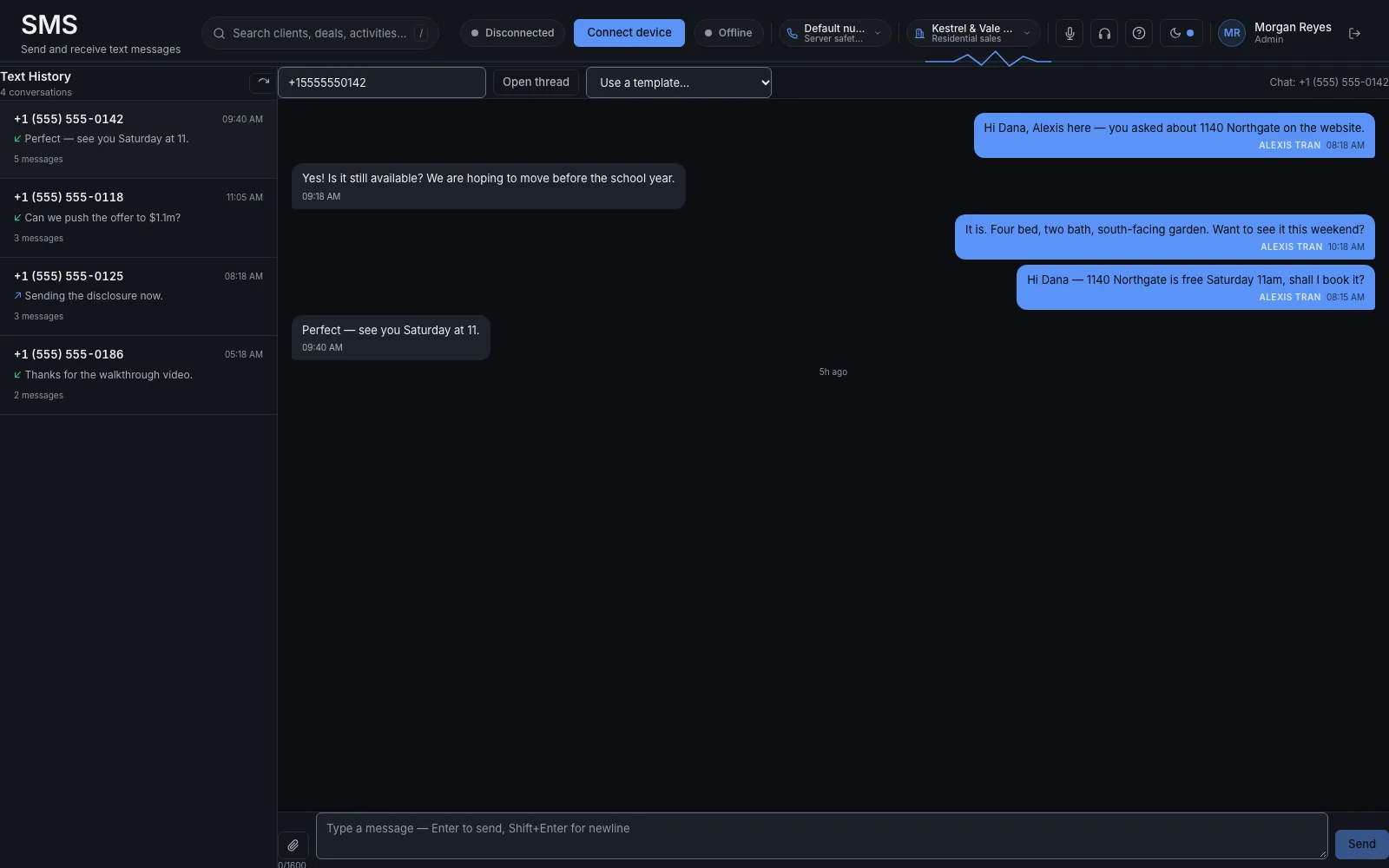
A text thread with Dana Whitfield about a Saturday showing. The names are fictional.
11
Quotes, documents and e-signature
Send a quote, generate the paperwork, and get it signed, from the same record.
Say
A quote from the deal.
The paperwork generated, not retyped.
The signature lands on that same record.
Example
Dana is ready. Maya sends the quote from the deal, the agreement is generated, and Dana signs it. The signed copy sits on her record.
If it goes wrong
The signer gets the link by email. Outbound email is set up with you before this turns on. Until that setup is done, the link is not sent.
How we know
Quotes, generated documents, and e-signature are built and running for our own teams. The email that carries the signing link is the part we switch on with you.
The limit
No outbound email, no signed copy. The two are one setup.
The screen
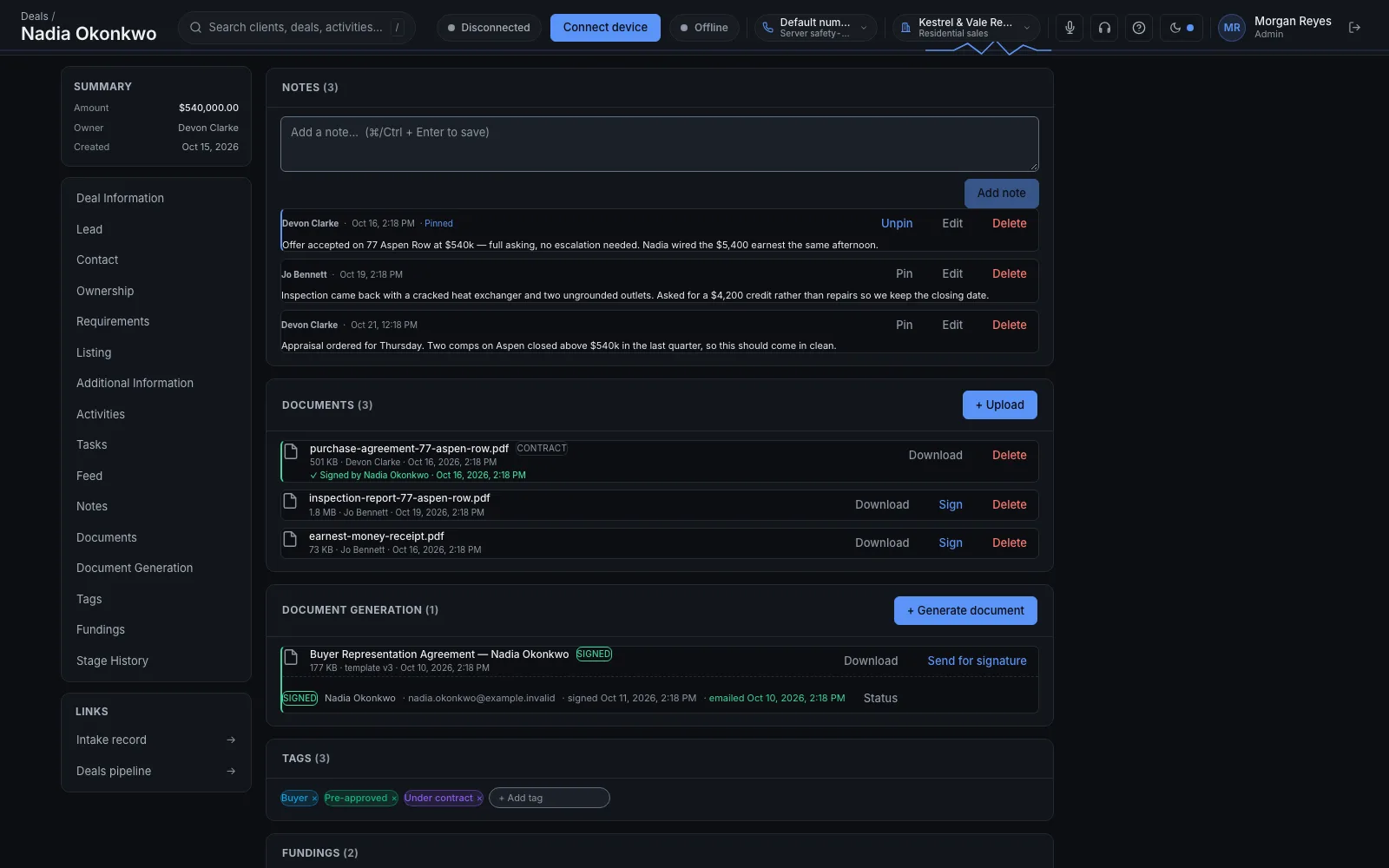
The signed purchase agreement on the Nadia Okonkwo deal. The names are fictional.
12
Calendar and appointments
The team shares one calendar. Booking a time creates the deal.
Say
One calendar for the team.
The appointment stays on that person’s record.
Booking the time creates the deal the conversation will live on.
Example
Dana picks Thursday at 10. The appointment is on the shared calendar and on her record, and the deal exists so Thursday’s conversation has somewhere to go.
If it goes wrong
A change made in Google Calendar, Outlook, or Calendly does not show up here. If your team lives in another calendar, say so before we switch this on.
How we know
The shared calendar is on for our own teams. Sync with another calendar is not built.
The limit
This calendar does not sync with Google, Outlook, or Calendly.
The screen
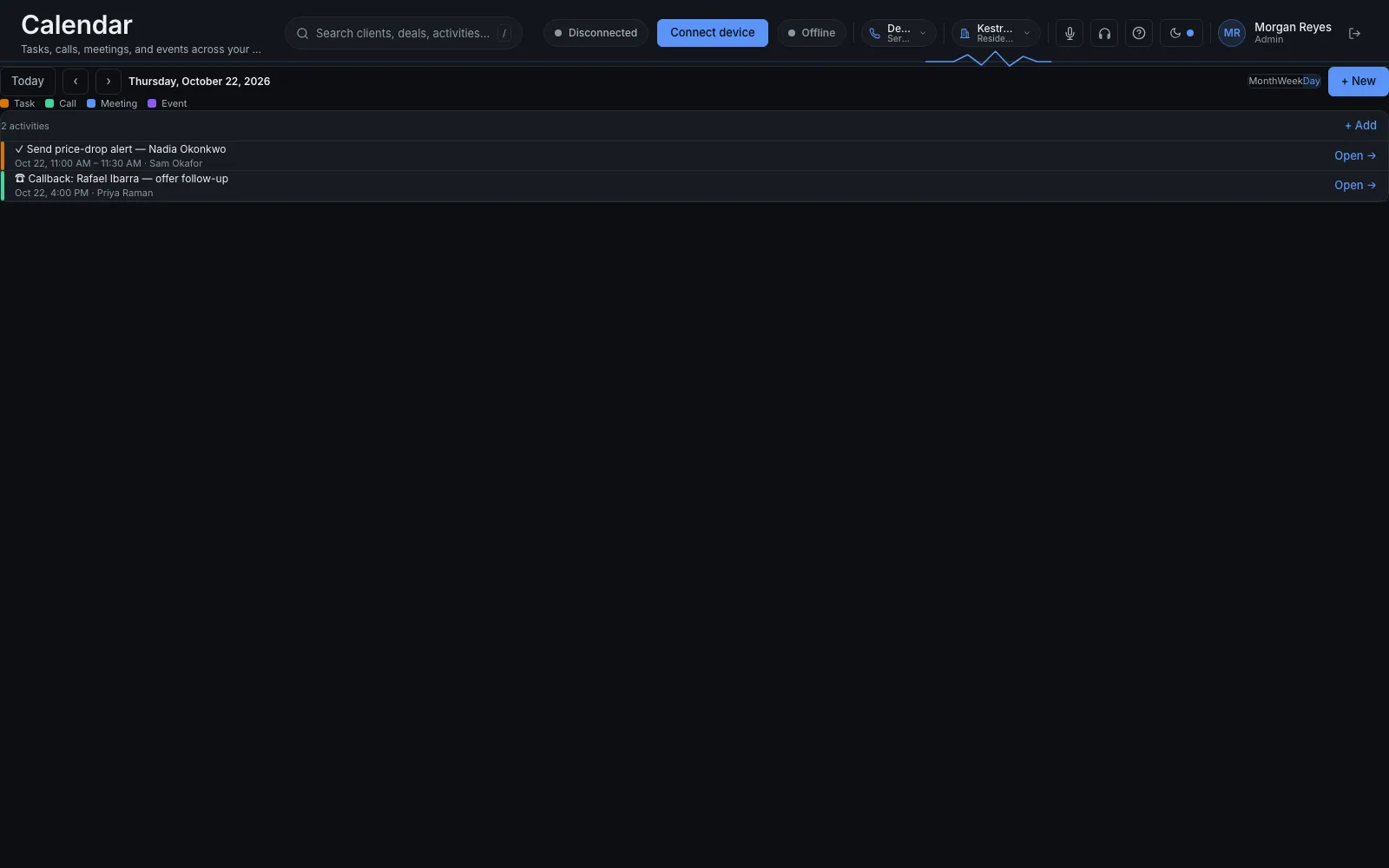
Thursday on the team calendar. A price-drop alert for Nadia Okonkwo, and a callback with Rafael Ibarra. The names are fictional.
13
Zapier, Make and n8n
The tools you already use can read and write your leads.
Say
Zapier, Make, and n8n, through a key we issue with you.
A webhook when a lead changes.
A published n8n node, n8n-nodes-callq.
Example
A new lead lands in the sheet your ads already write to. Zapier creates the person here, with the source attached, and Maya sees them on the list. Nobody retypes it.
If it goes wrong
The key is issued when we set you up. There is no public sign-up that mints one, and a key from another company cannot see your leads.
How we know
The API, the outbound webhooks, and the n8n node are published. A key is created per customer, with you.
The limit
We issue the key. It is not self-serve.
The screen
Not captured yet: A lead arriving from Zapier, with its source already on the record.
Runs every day for the sales teams inside our own company. Built and tested. We finish the setup with you, then turn it on for your team.